
Blog /
Versioning and rollback: what happens when an app update breaks
A plugin update that breaks a WordPress site is a memorable event. You FTP in, you rename wp-content/plugins/the-bad-plugin, you go look at your backup, you restore the database from twelve hours ago, you tell the client what happened, you spend the afternoon writing a retro.
A DesignSetGo App update that breaks is not memorable. It is one CLI command and three seconds. You do not even open the browser to confirm; the CLI tells you the rollback succeeded and you move on.
This post is the model that makes that possible. Two principles, three commands, and one mental shift about where state lives.
The two principles
The bundle is immutable. State lives in WordPress.
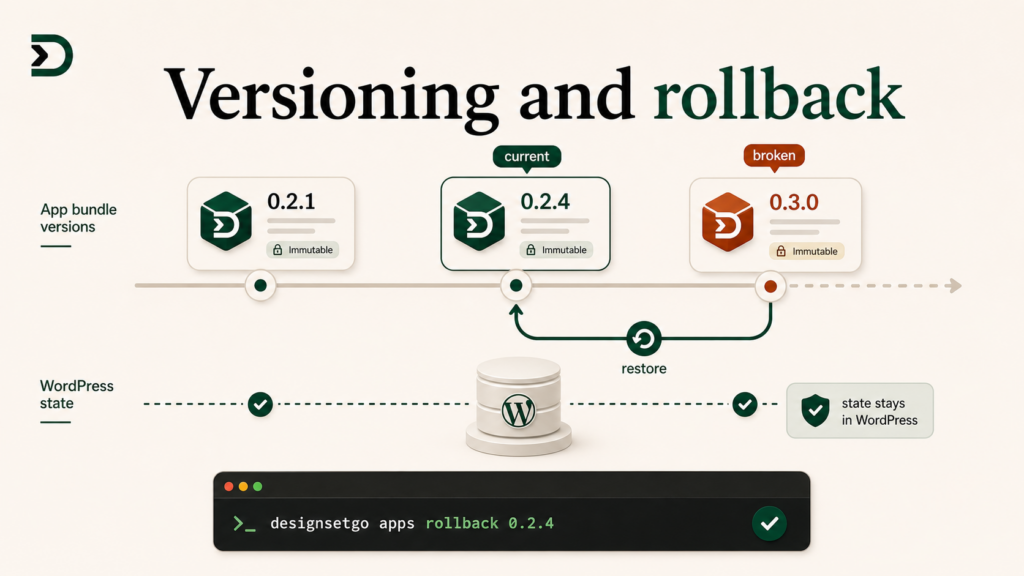
A DesignSetGo App is a static bundle: HTML, JavaScript, CSS, the manifest. Every deploy creates a new immutable version of that bundle. The site keeps every version it has ever seen. Switching between versions means pointing the runtime at a different folder; it does not migrate anything.
App state (the storage your app uses, the user data, the per-app settings, the WordPress posts the app reads) lives in WordPress. It is shared across versions. Rolling the bundle back to last week’s version does not roll user data back. The bundle is yours; the state is the user’s. Those two things have different lifecycles, and pretending otherwise is the failure mode that makes plugin updates scary.
If you internalize that split, rollback is trivial. If you do not, you will eventually ship a bundle that mutates state in incompatible ways, and the rollback will leave you with stale data the new bundle cannot read. That is a real failure mode and worth a section of its own.
The three commands
npx designsetgo apps versions list
Shows you every version that has ever been deployed for an app on a given site, with timestamps:
$ npx designsetgo apps versions list --app=mortgage-calc --site=https://realestate.example
mortgage-calc on realestate.example:
  0.3.0   * (current)   2026-06-02 09:12:14
  0.2.4               2026-05-30 17:08:51
  0.2.3               2026-05-29 11:33:02
  0.2.2               2026-05-28 14:45:19
  0.2.1               2026-05-27 18:22:08
By default the site keeps the last 10 versions of each app, with all-time history available behind a flag. The default is configurable in wp-config.php if you want more or fewer.
npx designsetgo apps rollback <version>
Switches the active version to a previous one:
$ npx designsetgo apps rollback 0.2.4 --app=mortgage-calc --site=https://realestate.example
Rolling back mortgage-calc on realestate.example from 0.3.0 to 0.2.4...
Done. Version 0.2.4 active in 1.4s.
The rollback is instantaneous in any browser tab that loads the app afterward. Open tabs continue serving the old version until reload (because they have already loaded the bundle), which is usually what you want; if you need a hard cutover you can also force a runtime evict with --evict.
npx designsetgo apps versions promote <version>
The inverse of rollback. If you have rolled back to 0.2.4 and want to bring 0.3.0 back without re-deploying:
$ npx designsetgo apps versions promote 0.3.0 --app=mortgage-calc --site=https://realestate.example
Promoting mortgage-calc to 0.3.0 on realestate.example...
Done. Version 0.3.0 active in 1.1s.
This is the “wait, the new version was fine, I was looking at a stale tab” recovery. Common, and the CLI is built for it.
What rollback restores, what it does not
Restored (these come from the bundle):
- All HTML, JavaScript, CSS in the bundle.
- The manifest, including permissions and external origins.
- The block name and any block metadata.
- The display modes the app supports.
Not restored (these live in WordPress):
- The app’s storage (
dsgo.storage.app.*keys). - Per-user storage (
dsgo.storage.user.*keys). - WordPress posts the app reads.
- User accounts.
- Connector configurations.
The split exists because state is the user’s, not the bundle’s. If your customer used the calculator yesterday and saved a quote to per-user storage, rolling back the bundle should not delete that quote. It does not.
This means you have to write your bundle versions to be state-compatible across versions in both directions. The new version should be able to read the old version’s storage shape, and the old version (the one you might roll back to) should not be surprised by data the new version wrote.
In practice this looks like:
- Never delete storage keys in a version, only add. If you used to store
{quoteV1: {...}}and now you want{quoteV2: {...}}, write both and read from both. Stop writing the old key after a few versions, but never stop reading it. - Treat storage as a documented protocol, not an implementation detail. Versioned read paths, gentle migration. Same hygiene as a database schema.
- The harness’s storage migration helper makes this easier. It is opt-in and handles the most common “rename a key” and “split a value” patterns.
If you keep that discipline, rollback works the way the CLI promises. If you do not, rollback is fine but the next deploy after the rollback might be surprised by data the rolled-back version wrote in shape A while you expected shape B.
When you would use this
In normal practice, rollback is the safety net you almost never need. You see “version 0.3.0 deployed” in the CLI, you open the page in a browser, you confirm it looks right, and that is the entire flow.
The cases where rollback earns its keep:
You shipped a bug and a customer noticed before you did. Rollback to the previous version while you debug locally. Two seconds. The customer’s session was probably already on the rolled-back version because their tab was open. Reload the page, the bug is gone, ship a fix when you have one.
A dependency broke. You upgraded a charting library between 0.2.4 and 0.3.0 and the new version has a render bug at certain screen widths. Roll back to 0.2.4, pin the chart library version, redeploy.
An agency-wide regression. You shipped a new version to all 30 client sites and the client portal in Saturday’s tutorial has a layout issue on dark themes. You can roll back across all 30 sites with the same multi-site CLI flags you used to deploy. npx designsetgo apps rollback 0.2.4 --app=client-portal --sites-from=clients.txt.
The customer asked for a feature back. Sometimes “we removed it in 0.3.0 and three of our biggest customers complained” is the truth. Rollback while you decide whether the right move is a re-add or a config flag.
What this does not solve
Rollback is not a replacement for backups. If your app is the only thing reading and writing a particular WordPress option, and a bad version corrupts that option, the rollback does not restore the option. Backups do.
It also does not solve “the customer’s WordPress site is on fire for unrelated reasons.” DesignSetGo Apps run sandboxed; they do not break the site, but they also cannot rescue the site when something else does. Backups still belong in your stack.
What rollback does solve: the specific failure mode where an app update breaks the app and you need it un-broken right now. That used to be a 20-minute fire drill. Now it is two seconds and a CLI command.
The shorter version
Two principles: bundles are immutable, state lives in WordPress. Three commands: versions list, rollback, versions promote. The discipline you need: write state-compatible across versions, never delete storage keys, treat storage like a protocol.
If you do that, you stop worrying about app updates the way you used to worry about plugin updates.
Further reading
- Per-app, per-user storage: the deeper tutorial on state (publishes June 9).
- The GitHub Action: continuous deploy from your repo: how rollback fits into a CI workflow.
- CLI reference (when it lands): the full command surface.