
Blog /
App secrets, the right way: why DesignSetGo never asks you to paste a key into your source
The first onboarding step in most AI plugins on WordPress is the same. A settings page. A box that says “Paste your OpenAI API key here.” A note in small text that says “we store this securely.” A submit button.
DesignSetGo Apps does not have that page. We do not ask for the key, we do not store the key, and the app you build does not see it. This is not an oversight. It is a v1 P0 we built around the architecture WordPress 7.0 shipped this spring.
This post is the short version of why, and a brief tour of the three secret-storage anti-patterns we did not implement, with what we did instead.
What WordPress 7.0 changed
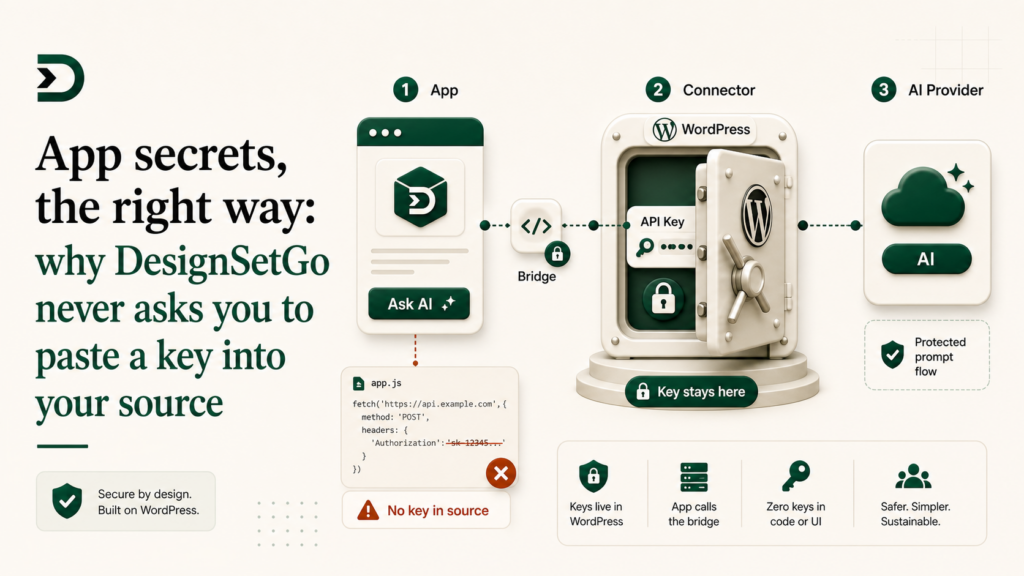
WordPress 7.0 shipped a native AI Client and a Connector system. Connectors are the part that matters here. A site owner adds an OpenAI Connector (or Anthropic, or Google, or their company’s internal LLM) in Settings → Connectors, pastes the key once, and any plugin on the site can request inference through wp_ai_client() without ever touching the credential.
The credential lives in WordPress. The model belongs to the site owner. The bill goes to whatever payment method the site owner put on the Connector. Plugins do not hold keys.
A DesignSetGo App calls dsgo.ai.prompt(). The bridge routes that call through the site’s configured Connector. The app never sees the key, the runtime never sees the key, and we (the plugin vendor) never see the key.
That is the whole story. The rest of this post is the explanation of why the other three patterns are wrong and what doing them anyway would cost you.
Anti-pattern 1: the app holds the key
This is the worst version. The app bundle ships with an OPENAI_API_KEY baked into JavaScript. The minute the bundle hits a browser, the key is in view-source. The minute it is in view-source, it is on a scraper somewhere. The minute it is on a scraper, it is billing your card.
You would not write that on purpose. AI agents will write it for you the first time you let one. “Just paste the key inline” is the path of least resistance and Claude / Cursor / Bolt have all suggested it in the wild when the host environment does not stop them.
DesignSetGo stops them. The starter CLAUDE.md says explicitly: never embed credentials in the bundle. The bridge does not surface a “set secret” call. The CLI deploy does not accept environment files that get bundled into the static output. If the agent tries this path, every guardrail in the harness fires.
Anti-pattern 2: the plugin holds the key
This is the path most existing AI WordPress plugins took. The plugin ships a settings page, the site owner pastes a key, the plugin stores it in wp_options (encrypted or not), and the plugin makes outbound API calls on the user’s behalf.
It works. It also commits you to three things you probably did not plan on.
Anthropic and OpenAI’s commercial terms care about who is calling. When a plugin holds the key and orchestrates calls, the plugin vendor is the customer-of-record from the model provider’s perspective in important ways. There are policies about reselling inference, about per-customer separation, about how the keys are used. Plugins built before WP 7.0 are sitting on contracts they may not have read carefully.
Your margin is illusory. If you charge a subscription, your costs scale with usage. If a customer’s app does a 50k-token prompt every time it loads, that is on your bill. The mental model of “AI plugin as SaaS” collapses the moment a power user shows up.
You inherit the security responsibility. If the key leaks, it leaks from your plugin’s storage. Your incident, your remediation, your trust hit.
WP 7.0’s Connector model takes all three of those off the plugin author’s plate. The key is in WordPress, owned by the site owner, used at the site owner’s expense, under the site owner’s relationship with the model provider. That is the right shape. We did not invent it. We just got out of its way.
Anti-pattern 3: the proxy
A clever middle path that some AI plugins took before WP 7.0. The plugin authenticates against a vendor-hosted proxy, and the proxy holds the key and meters the calls. The site owner pastes a vendor-issued token instead of an OpenAI key, and the vendor handles all the upstream contracts.
This is structurally fine and a reasonable answer in a world without Connectors. It is also structurally redundant in a world with Connectors. The proxy adds latency, an extra service to run, a per-customer bill the vendor has to model, and a single point of failure. WP 7.0 made the proxy unnecessary by putting the same auth/meter layer in WordPress itself.
The plugins that built proxies before WP 7.0 have to decide in the next twelve months whether to keep operating them. The plugins that did not, because they shipped after WP 7.0 and read the dev note carefully, get a structural simplification for free.
What you do instead
In a DesignSetGo App, the AI call is one line:
import { dsgo } from '@designsetgo/app-client';

const result = await dsgo.ai.prompt({
  system: "You are a helpful assistant.",
  messages: [{ role: 'user', content: 'Hello.' }],
});
No key. No model name (the Connector decides, or you can pass a preference). No fetch to an external origin (it goes through the bridge, not the network). No CORS dance.
The bridge:
- Resolves the site’s configured Connector.
- Sends the prompt through it.
- Returns the response.
- Logs usage to the site owner’s WordPress usage dashboard.
If the site does not have a Connector configured, the call fails with a clear error and an admin notice to set one up. If the site has one configured but disabled (the site owner toggled it off for the month), the call also fails clearly. Your app does not crash; it gets a typed error and you can decide what to render.
The full surface lives in BRIDGE-API.md §ai and a working example is in examples/recipe-ranker, which builds a content tool that calls the AI bridge half a dozen times in one app.
Pro adds, but the principle holds
The Harness (in DesignSetGo Apps Pro) does its own inference for code generation. It also runs through Connectors. The Pro upgrade is the harness, not “we hold a key for you.” The same architectural rule applies: we do not store provider credentials.
If you want to plug an internal LLM into a DesignSetGo site, register it as a Connector once in WP settings and every app on that site can use it. No app code changes.
The shorter version
We do not hold your API keys. We did not build a proxy. We do not have a settings page that says “paste your OpenAI key here.” WordPress 7.0 made the Connector the right place for credentials, and putting them anywhere else makes the vendor pay for it later.
The feature I am proudest of is the one we did not build.
Further reading
- Why we don’t hold your API keys: the long-form essay on the commercial-terms angle.
- The 30k ITPM cliff: the field report from shipping the Riff harness into Anthropic’s rate limits.
- docs/wp-7-strategy.md: the full strategy doc on WP 7.0 and what it changes for plugin authors.