
Blog /
The GitHub Action: continuous deploy from your repo
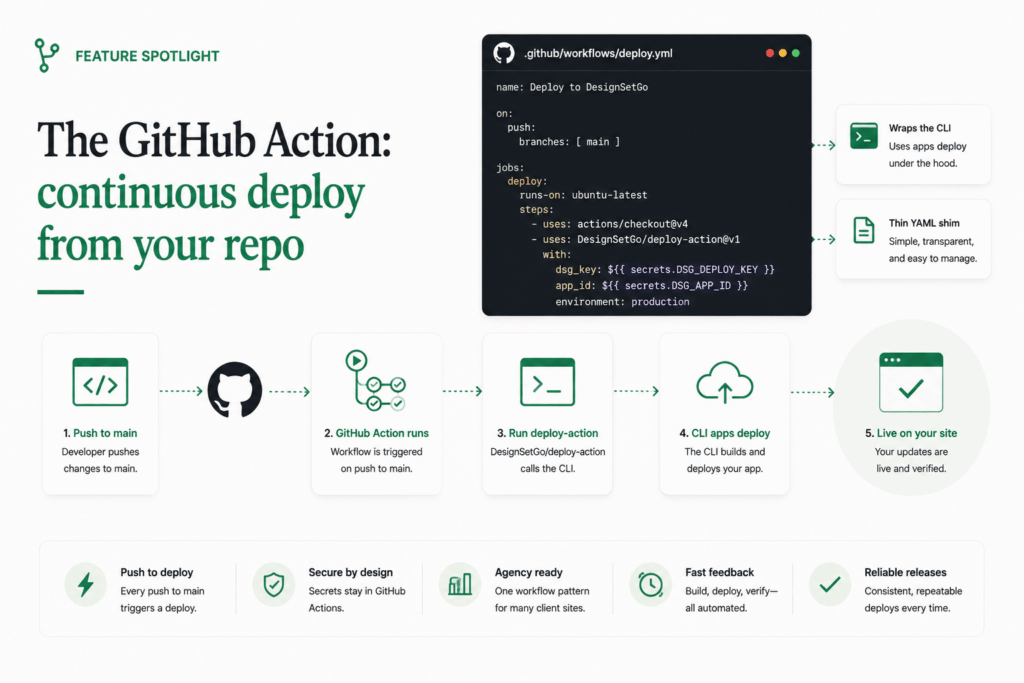
The CLI workflow in Build a WordPress app with Claude Code in 15 minutes ends with npx designsetgo apps deploy --build running from your laptop. That’s the right shape for individual developers iterating on one or two apps. It’s the wrong shape for an agency with twenty client sites and a team of five, because the laptop-deploy pattern has a few subtle problems at scale:
- Who deployed what, when? “I think Sarah did it Wednesday” is not an audit trail.
- The deploy ran on a developer’s machine, with whatever Node version they happened to have installed and whatever local edits they hadn’t committed yet. Reproducible? Maybe.
- The application password lives on the developer’s laptop. The developer leaves the team and you discover you don’t have a clean revocation story.
- A rollback is “redeploy the previous commit,” which requires the previous commit to still be checked out somewhere, on a laptop that still has credentials.
The GitHub Action is the version that scales. Push to main, the app deploys. Every deploy is a CI-recorded artifact with a logged author, a reproducible build environment, and credentials that live in GitHub Secrets and not on anyone’s laptop.
Adding the action to your repo
In your project (the one created by npx designsetgo apps init), add .github/workflows/deploy.yml:
name: Deploy DSGo App

on:
  push:
    branches: [main]

jobs:
  deploy:
    runs-on: ubuntu-latest
    steps:
      - uses: actions/checkout@v4
      - uses: actions/setup-node@v4
        with:
          node-version: '20'
      - run: npm ci
      - run: npm run build
      - uses: DesignSetGo/deploy-action@v1
        with:
          site: ${{ secrets.DSGO_SITE }}
          username: ${{ secrets.DSGO_USER }}
          app-password: ${{ secrets.DSGO_APP_PASSWORD }}
          bundle: dist
That’s the whole shim. The action installs @designsetgo/cli, exports the credentials to env vars (DSGO_SITE, DSGO_USER, DSGO_APP_PASSWORD), runs designsetgo apps deploy <bundle> --json, and exposes app-url and app-id as step outputs you can chain into downstream steps (a Slack notify, a PR comment, whatever). The whole workflow runs in under a minute for a typical app.
Setting up the secrets
In your GitHub repo’s Settings → Secrets and variables → Actions, add three repository secrets:
DSGO_SITE:https://yoursite.comDSGO_USER: a WordPress username on the siteDSGO_APP_PASSWORD: an application password generated for that user
Application passwords are revocable from Users → Profile → Application Passwords in wp-admin. If a developer leaves the team, you revoke the password and rotate it; you don’t have to change the user’s main password, and you don’t have to coordinate with anyone else who might be using the same credential elsewhere.
The app-password input accepts the WordPress-formatted “abcd efgh ijkl …” string with spaces (paste it from wp-admin verbatim). The CLI strips the whitespace before sending.
A small recommendation: create a dedicated WordPress user for deploys (e.g., deploy-bot) with the role and capabilities the deploy needs. Don’t use a real human’s account as the deploy identity. The audit trail in your wp-admin’s log (if you have an audit-log plugin) is cleaner when the deploy actor is distinct from the editor actors.
Using the action’s outputs
app-url and app-id come back as step outputs after a successful deploy. Use them in downstream steps:
- uses: DesignSetGo/deploy-action@v1
  id: deploy
  with:
    site: ${{ secrets.DSGO_SITE }}
    username: ${{ secrets.DSGO_USER }}
    app-password: ${{ secrets.DSGO_APP_PASSWORD }}
    bundle: dist

- name: Notify Slack
  run: |
    curl -X POST -H 'Content-Type: application/json' \
      --data '{"text":"Deployed ${{ steps.deploy.outputs.app-id }} to ${{ steps.deploy.outputs.app-url }}"}' \
      ${{ secrets.SLACK_WEBHOOK_URL }}
The agency workflow
This is where the action earns its keep. An agency running 20 client sites with custom DSGo Apps for each:
- One repo per client (or per app, if the client has multiple).
- Each repo’s deploy.yml has the client’s site URL and credentials in secrets.
- Pushes to main deploy automatically.
- Every deploy is logged in the GitHub Actions history; if something goes wrong, you can roll back by reverting the merge commit and pushing main again.
The CLI alternative (“SSH in, run npx designsetgo apps deploy”) works for one or two clients. It doesn’t work for twenty. The action removes the human from the deploy step, which means deploys happen consistently, are auditable, and can be triggered by anyone with merge rights to the repo. For an agency, this means a junior developer can ship a hotfix to a client site without escalating, because the merge rights and the deploy capability are the same permission.
To deploy to multiple sites from the same repo, list the action multiple times in the workflow (one block per site) rather than reaching for a fan-out feature the action doesn’t have in v1.
What the action does NOT do
A short list of things the action stays out of in v1, with the reasoning:
- PR previews. Per-PR slug suffixes plus cleanup-on-close are explicitly deferred to v2. v1 deploys overwrite the production slug, so a PR-triggered deploy would step on the live app — don’t wire the action to PRs unless you also restrict it to a specific branch.
- OIDC auth. Would let you skip storing app passwords; requires WP-side trust that isn’t on the roadmap.
- Multi-site fan-out. No internal loop. List the action twice (or N times) in the same workflow if you need to deploy to multiple sites.
- Rollbacks.
apps deployis install-or-update; there’s norevertcommand. To roll back, redeploy the previous commit. - Database migrations. DSGo Apps don’t have their own schema; storage rides on the plugin’s tables. Nothing to migrate.
- Asset uploads to a CDN. The bundle is served by WordPress; assets travel with the bundle. If you want CDN distribution, that’s a hosting-level decision (Cloudflare in front of the WP origin, etc.), not a deploy-action concern.
- Smoke tests after deploy. The action confirms the deploy succeeded; it doesn’t run a Playwright suite. Add a separate job in the workflow if you want post-deploy verification.
Validating before deploying
The action runs apps deploy which runs the bundle through preflightBundle and inline-preflight before posting to the site. This catches:
- Manifest fields that don’t conform to the v1 schema.
- External origins referenced in the bundle that aren’t declared in
runtime.external_origins. - Inline content that fails the sanitizer’s preview pass.
- Missing or malformed
dsgo-app.json.
Validation failures fail the workflow with a non-zero exit code; the deploy never reaches the site. The validation pass is the same one the plugin runs at install time, so a passing CI run is a high-confidence install.
Multi-environment deploys
For agencies running staging and production environments per client, run the action twice with branch filters:
jobs:
  deploy-staging:
    if: github.ref == 'refs/heads/develop'
    runs-on: ubuntu-latest
    steps:
      - uses: actions/checkout@v4
      - uses: actions/setup-node@v4
        with: { node-version: '20' }
      - run: npm ci && npm run build
      - uses: DesignSetGo/deploy-action@v1
        with:
          site: ${{ secrets.STAGING_SITE }}
          username: ${{ secrets.STAGING_USER }}
          app-password: ${{ secrets.STAGING_APP_PASSWORD }}
          bundle: dist

  deploy-prod:
    if: github.ref == 'refs/heads/main'
    runs-on: ubuntu-latest
    steps:
      - uses: actions/checkout@v4
      - uses: actions/setup-node@v4
        with: { node-version: '20' }
      - run: npm ci && npm run build
      - uses: DesignSetGo/deploy-action@v1
        with:
          site: ${{ secrets.PROD_SITE }}
          username: ${{ secrets.PROD_USER }}
          app-password: ${{ secrets.PROD_APP_PASSWORD }}
          bundle: dist
Two jobs, one per environment, each gated on a branch. Both build separately (Actions doesn’t share artifacts across jobs by default), but npm ci && npm run build finishes in 20-30 seconds for a typical project so it’s not worth a separate cache job.
Where to go next
- The Claude Code tutorial for the manual CLI deploy that the action automates.
- The next post: white-labeling DSGo for agency clients.
- The GitHub Action lives at the
DesignSetGo/deploy-actionrepo on GitHub when it ships; pin to@v1to inherit patch and minor updates automatically.