
Blog /
Per-app, per-user storage: what it is, what it is not, and how to model it
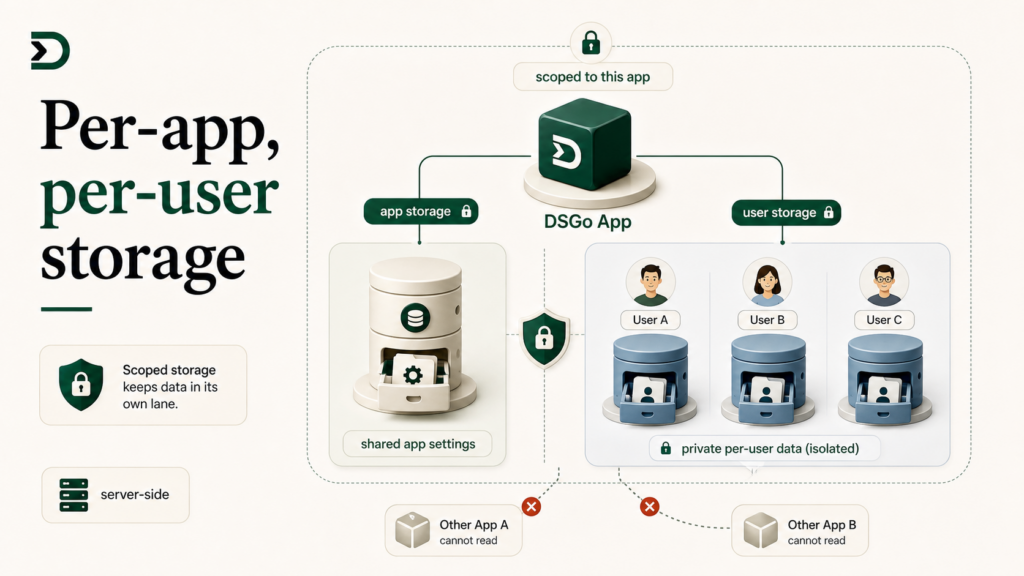
The storage surface in the DesignSetGo bridge is two methods deep. That should make it easy. It also makes it the place new app authors reach for the wrong abstraction first, then have to refactor halfway through.
This post is the model that gets you to the right abstraction on the first try. The two surfaces, the four patterns that cover 90% of real apps, and the one gotcha that catches everyone.
If you are about to write localStorage.setItem(...) in a DesignSetGo App, stop and read this first.
The two surfaces
// Per-app storage. Shared across every visitor to the site for this app.
await dsgo.storage.app.set('feature_flag', true);
const flag = await dsgo.storage.app.get('feature_flag');

// Per-user storage. Tied to the WordPress user looking at the page.
await dsgo.storage.user.set('preferences', { theme: 'dark' });
const prefs = await dsgo.storage.user.get('preferences');
Both are server-side. Both persist across browsers, devices, sessions, and cache clears. Both are scoped to your app: another app on the same site cannot read your storage. The runtime guarantees that boundary.
The difference is who can read what.
dsgo.storage.app.* is one bucket per app per site. Every visitor to the site reads and writes the same values. Use it for app-level configuration, leaderboards, shared counters, anything where the data belongs to the app, not the user.
dsgo.storage.user.* is one bucket per app per site per user. Each WordPress user has their own values. A logged-out visitor cannot use this surface (the call returns null). Use it for preferences, drafts, per-user history, anything where the data belongs to the user, not the app.
Why not localStorage
The first thing developers from a React-on-Vercel background reach for is localStorage. It is convenient and free.
It is also wrong for almost everything a DesignSetGo App wants to do.
localStorage is browser-local. It is gone if the user clears site data, switches browsers, signs in from a phone, or uses a private window. Most apps’ “save the user’s preference” use case wants the preference to survive all of those. localStorage will not.
localStorage is also not scoped by user. If two people log into the same browser (a household sharing a laptop, a desktop in an agency office), they share the same localStorage. The “this is my draft” data leaks across users in a way the user does not expect.
dsgo.storage.user.* solves both. The data is server-side, tied to the WordPress user account, and follows the user across devices. The data is also scoped to your app, so another DesignSetGo App on the same site cannot read it.
The exceptions where localStorage is fine: ephemeral UI state that genuinely should not survive a tab close (a wizard’s current step), and data that is genuinely device-local (a “this device is verified” token, if you ever needed one). Those cases are rare. Default to the bridge.
The four patterns that cover most apps
Pattern 1: app-level configuration
A flag the site owner sets in the app’s admin UI that affects what every visitor sees:
// In the admin UI (display.modes: ["admin"]):
if (await dsgo.user.can('manage_options')) {
  await dsgo.storage.app.set('show_promo_banner', true);
}

// In the public-facing surface (display.modes: ["block"]):
const showBanner = await dsgo.storage.app.get('show_promo_banner');
if (showBanner) {
  renderBanner();
}
app.* is shared across users, so the admin’s toggle affects every visitor.
Pattern 2: per-user preferences
A theme toggle, a measurement-unit preference (kg/lb), a “do not show me this tip again” flag:
// On preference change:
await dsgo.storage.user.set('preferences', { units: 'kg', theme: 'dark' });

// On load:
const prefs = await dsgo.storage.user.get('preferences') ?? {
  units: 'lb',
  theme: 'light',
};
user.* follows the user across devices. The fallback handles the logged-out case (where get returns null).
Pattern 3: a leaderboard
App-level data the user writes to, not just reads:
async function submitScore(score: number) {
  const me = await dsgo.user.current();
  const board = (await dsgo.storage.app.get('leaderboard')) ?? [];
  board.push({ user: me.name, score, at: Date.now() });
  board.sort((a, b) => b.score - a.score).splice(10); // top 10
  await dsgo.storage.app.set('leaderboard', board);
}
app.* because the leaderboard is shared. There is a subtle race condition here: two users submitting simultaneously can clobber each other. For real leaderboards, use dsgo.storage.app.update() (the atomic-update surface), or accept that a leaderboard is best-effort. The bridge cookbook has a worked version.
Pattern 4: per-user drafts
A long form the user is filling out, where you want to survive their browser closing accidentally:
// As they type (debounced):
const onChange = debounce(async () => {
  await dsgo.storage.user.set('draft', { text: textarea.value, at: Date.now() });
}, 500);

// On load:
const draft = await dsgo.storage.user.get('draft');
if (draft && Date.now() - draft.at < 7 * 24 * 60 * 60 * 1000) {
  textarea.value = draft.text;
  showRestoreNotice();
}
user.* because the draft is private to the user. Time-limit the restore so a six-month-old draft does not surprise them.
The gotcha that catches everyone
dsgo.storage.user.* requires a logged-in user. If the visitor is logged out, every call returns null (for get) or throws (for set`).
Apps that build their entire experience around per-user storage and forget to handle the logged-out case will have a confusing failure mode the first time a guest visitor lands on the page. The set fails, the UI shows the default, the user wonders why nothing they did stuck.
Two paths:
Require login for the app. If your app genuinely only works for logged-in users (a member dashboard, an agency client portal), check at the top:
const me = await dsgo.user.current();
if (!me) {
  window.location.href = '/wp-login.php?redirect_to=' + encodeURIComponent(location.href);
  return;
}
Degrade gracefully. If your app works for guests but is better for logged-in users (a recipe filter that remembers favorites, a calculator that saves results), fall back to in-memory state for guests and offer a “log in to save” CTA:
const me = await dsgo.user.current();
const memoryStore = new Map();

async function saveFavorite(id) {
  if (me) {
    const favs = (await dsgo.storage.user.get('favorites')) ?? [];
    favs.push(id);
    await dsgo.storage.user.set('favorites', favs);
  } else {
    memoryStore.set(id, true);
    showLoginPrompt();
  }
}
Pick the path on day one. Retrofitting the “log in to save” UX after you have shipped the bare per-user storage version is more work than building it up front.
What storage is not for
Three things storage is not the right answer for:
Searchable structured data. If your app needs to query, filter, or sort across many records, you want WordPress posts or a custom post type. Storage is a key-value store; it has no native query layer beyond “get me this key.” A leaderboard of 10 entries is fine. A leaderboard of 10,000 entries belongs in a CPT.
Files. Storage holds JSON. For files, use dsgo.media.upload() and store the resulting media ID in storage. The file lives in the WordPress media library; storage holds the reference.
Cross-app data. Storage is scoped to your app. If you need two DesignSetGo Apps to share data, the right path is WordPress posts (one writes, the other reads via dsgo.posts.list), not “ship the same storage key in both.” The runtime enforces the per-app boundary.
What storage is great for
The things localStorage would be great for if localStorage were server-side: user preferences, per-user drafts, per-app counters, leaderboards under 100 entries, “did the user dismiss this banner,” “what wizard step were they on when they closed the tab,” “what color theme have they been using,” “what was their last calculator result so we can show it again.”
Most apps end up using both surfaces. App for things like configuration and shared counters; user for things like preferences and drafts. Once you internalize which is which, the bridge has nothing else to teach you about storage.
Further reading
- BRIDGE-API.md §storage: the full method surface.
- The bridge cookbook: four patterns above are sketched in more depth.
- Build a member portal scoped to the logged-in user: the deep storage example.