
Blog /
Build a WooCommerce product configurator
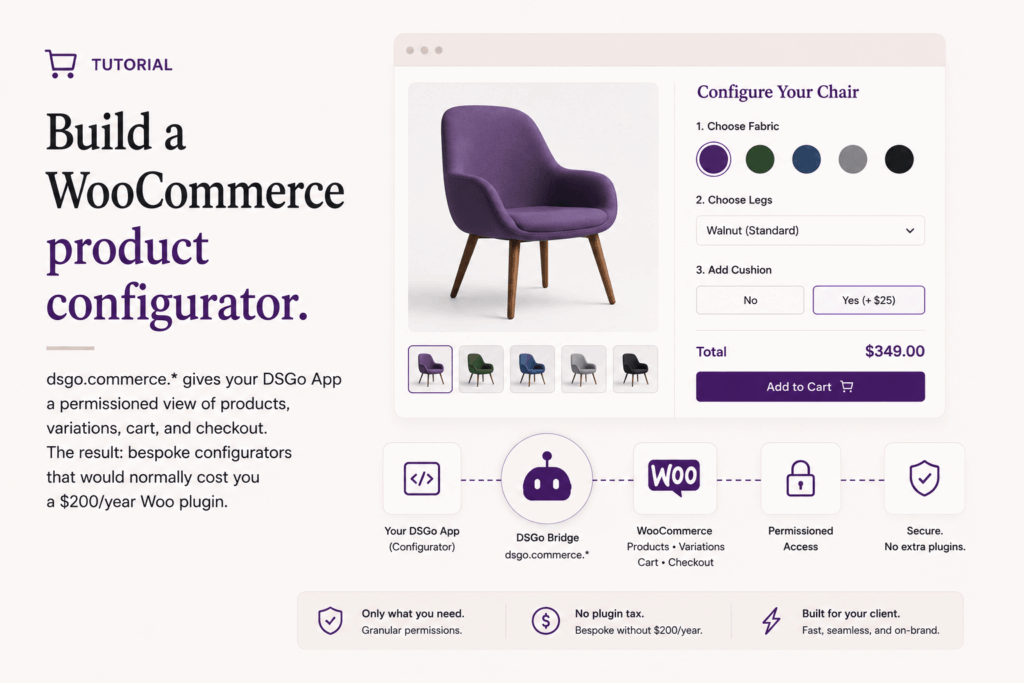
WooCommerce is the most-customized plugin in the WordPress ecosystem and also the most-frustratingly-customized one. Anything beyond the default product page reaches for a third-party Woo extension ($79 here, $129 there, “Pro version unlocks variations” everywhere), a hand-written shortcode that breaks on Woo updates, or a developer with a folder full of template-overrides. Each of those has a maintenance load that compounds.
DSGo Apps gives you a third option: write the configurator as an iframe app, ask the bridge for the product data you need (with full variation support), and use the cart and checkout-handoff bridges to send the visitor through Woo’s own checkout. The Woo extension space charges $99-299 per plugin per year for things you can build in an afternoon once you have the bridge.
This post walks through examples/shop, which demonstrates a product grid, detail page with variation pickers, cart, and hosted-checkout handoff.
The bridge surface
dsgo.commerce.* is the v1.x commerce surface. It calls Abilities first (so anything Woo registers as an ability is available without further config) and falls back to Woo’s Store API for surfaces that aren’t yet ability-shaped. The v1 namespace covers:
dsgo.commerce.products.list(query?)and.get(id)(variations are listed viaproducts.list({ type: 'variation', parent: <id> })).dsgo.commerce.cart.get(),.addItem(item),.updateItem(item),.removeItem(itemKey).dsgo.commerce.checkout.openHostedPage()returns the visitor’s hosted-checkout URL with the cart pre-loaded.
Permissions for the shop example:
"permissions": { "read": ["abilities", "user", "commerce"], "write": [] },
"abilities": {
  "consumes": [
    "woocommerce/list-products",
    "woocommerce/get-product",
    "woocommerce/get-cart",
    "woocommerce/cart-add-item",
    "woocommerce/cart-update-item",
    "woocommerce/cart-remove-item"
  ]
},
"commerce": {
  "providers": ["woocommerce"],
  "endpoints": ["products", "cart", "checkout"]
}
Two manifest blocks beyond permissions.read:
abilities.consumes. The list of Woo abilities the app expects to be available. The install dialog lists them. If a Woo update removes one, the install fails preflight; the app never ends up in a half-broken state at runtime.commerce.endpoints. The bucket detector activates the “Commerce” install bucket whenever this is non-empty. The dialog lists which surfaces (products, cart, checkout) the app reaches; the site owner sees the truth, not a generic “this app uses commerce” line. (Why this matters in detail is in the permission buckets post.)
The dialog rendered for this manifest shows three buckets: Read content, AI (no), Commerce. The AI bucket isn’t activated because the app doesn’t request permissions.read: ["ai"]; configurators usually don’t need it.
The configurator UX
The grid view comes from products.list:
const dsgo = window.dsgo;

const result = await dsgo.commerce.products.list({
  category: 'desks',
  per_page: 50,
});

renderGrid(result.items ?? result);
For each product card, you read the Store API price shape and render with Intl.NumberFormat:
function formatPrice(price) {
  if (!price || !price.amount) return '';
  const minor = Number(price.minor_unit ?? 2);
  const major = Number(price.amount) / Math.pow(10, minor);
  return new Intl.NumberFormat(undefined, {
    style: 'currency',
    currency: price.currency || 'USD',
    minimumFractionDigits: minor,
    maximumFractionDigits: minor,
  }).format(major);
}
The Store API (and therefore the bridge) returns prices in minor units as strings: { amount: "9999", currency: "USD", minor_unit: 2 } is $99.99. Divide by 10^minor_unit once you’ve parsed to a number, then format. Don’t reach for parseFloat directly; minor-unit currencies (JPY at 0, KWD at 3) will quietly produce nonsense.
For variable products, the configurator’s interesting bit is the variation picker. Each variation axis is a <select>, the visitor’s selections are tracked in state, and matchedVariation() walks the parent’s variation list to find the exact product matching the current selection:
const result = await dsgo.commerce.products.list({
  type: 'variation',
  parent: parentProduct.id,
  per_page: 100,
});
const variations = result.items ?? result;

function matchedVariation() {
  return variations.find((v) =>
    v.attributes.every(
      (a) => state.variationSelection[a.name] === a.value
    )
  );
}
A few things worth knowing about variations:
- The Store API uses attribute term slugs as values for taxonomy attributes (where slug differs from name), and the literal name for custom attributes (where they’re the same). Store the slug in your selection state for taxonomy attrs; render the name as the option label. The example bundle handles this distinction in
availableTerms(). - Out-of-stock variations are still in the list. Each variation has
is_in_stockandis_purchasableflags. Disable the Add-to-cart button when either is false; show a “selected combination is out of stock” hint when the visitor lands on one. - Price ranges collapse to exact prices once a variation is matched. The parent product’s price is
{ min, max }; once the visitor picks a full combination, the matched variation has a singleprice.amountyou display instead. Update the price display reactively as selections change.
Adding to cart
When the visitor commits, the bridge call is one method:
async function addToCart(productId, variation, quantity = 1) {
  const cart = await dsgo.commerce.cart.addItem({
    id: productId,                  // parent ID, even for variable products
    quantity,
    variation,                       // [{attribute, value}, ...] or undefined for simple
  });
  state.cart = cart;
  render();
}
For variable products, you always pass the parent product’s id and supply the chosen attribute combination via variation, not the variation child’s id. Simple products skip the variation field entirely.
The cart returned by addItem (and by cart.get, cart.updateItem, cart.removeItem) is the full cart state. Update your local state with whatever the bridge returned; don’t try to mutate locally and reconcile later. The cart your app sees is the cart Woo has, which is the cart the visitor sees if they open /cart/ in another tab.
To update or remove a line, you key by the cart line’s key field (returned by cart.get on each item), not by product id — a cart can hold the same product twice with different variations:
await dsgo.commerce.cart.updateItem({ key: lineKey, quantity: 3 });
await dsgo.commerce.cart.removeItem({ key: lineKey });
Handing off to checkout
Don’t reimplement checkout. Don’t try to. Even the largest “headless commerce” companies don’t actually reimplement checkout for Woo; they hand off to Woo’s checkout page once the visitor commits. The bridge does this directly:
await dsgo.commerce.checkout.openHostedPage();That single call triggers a top-window navigation to the Woo checkout page, with the cart preserved. In iframe mode the bridge handles the top-navigation through a dsgo:nav-top message to the parent (the iframe sandbox blocks the iframe from navigating the top window directly). In inline mode the call navigates the current window. The returned { url, navigated } is informational; you don’t have to manually navigate.
Payment, fraud screening, taxes, shipping, order confirmation, post-purchase emails: all Woo. None of it your problem.
Why this is the right boundary
A short table of what each layer should own:
| Concern | Who owns it |
|---|---|
| Product catalog | Woo |
| Product variations and pricing | Woo |
| Cart state | Woo |
| Checkout, payment, fraud, taxes | Woo |
| Visual configurator UX | Your DSGo App |
| Custom validation rules (“this color isn’t available in this size in this region”) | Your DSGo App |
| Save-this-config-for-later | Your DSGo App with dsgo.storage.user.* |
Trying to take more than the right column above puts you in the position of reimplementing checkout, which is a months-long engagement that Woo updates regularly invalidate. Stay in the configurator layer; let Woo do what it does well.
What this replaces
This is the value proposition for a freelancer or agency:
- Custom product configurator plugins ($79-299/year). You write the configurator yourself in HTML and JS; you don’t pay for one.
- Headless storefronts on Vercel (Vercel cost + headless WP cost + glue layer). Your storefront is a DSGo App. Same domain, no glue, no CORS, no separate auth.
- Custom theme template overrides (developer time forever, breaks on theme updates). The app lives outside the theme. Theme updates don’t break it.
The cost saved per project is real. The cost saved over a year of running multiple Woo sites for clients is significant; for an agency, this is the single tool that most cleanly turns “Woo is hard to customize” from a recurring engagement-blocker into a configurator-shipped-yesterday.
What’s not in v1
A few things the commerce bridge doesn’t ship in v1, and what you do instead:
- Order management. The app cannot read order history or modify orders. If the visitor needs to see their orders, link them to Woo’s
/my-account/orders/page. The site already renders that page well. - Customer creation outside checkout. Woo creates the customer at checkout, and that’s the right time. Your app doesn’t need to do this.
- Payment method capture. Woo handles this. Don’t reimplement it inside the iframe; you’d be redoing PCI scope.
- Product creation/editing. Your configurator doesn’t author products. The merchant does, in wp-admin. Your app reads.
- Direct discount code entry from inside the configurator. v1 doesn’t expose a coupon-apply method. Visitors enter coupons at checkout, on the Woo page. (Future versions may add this.)
Deploy
git clone https://github.com/DesignSetGo/dsgo-apps.git
cd dsgo-apps/examples/shop
npx designsetgo apps deploy --build
The store is at https://yoursite.com/apps/shop/. Plug it into your nav, drop a link from the homepage, link to it from a category page; the bundle is a static, fast, theme-isolated front-end for products that already exist in Woo.
Where to go next
- The bridge API reference for the full
commerce.*surface and error codes. - The permission buckets post for what the Commerce bucket looks like in the install dialog.
- The next post: an AI content companion that publishes abilities the site’s agent can call.