
Blog /
Roles and capabilities: the WordPress concepts every app author needs to know
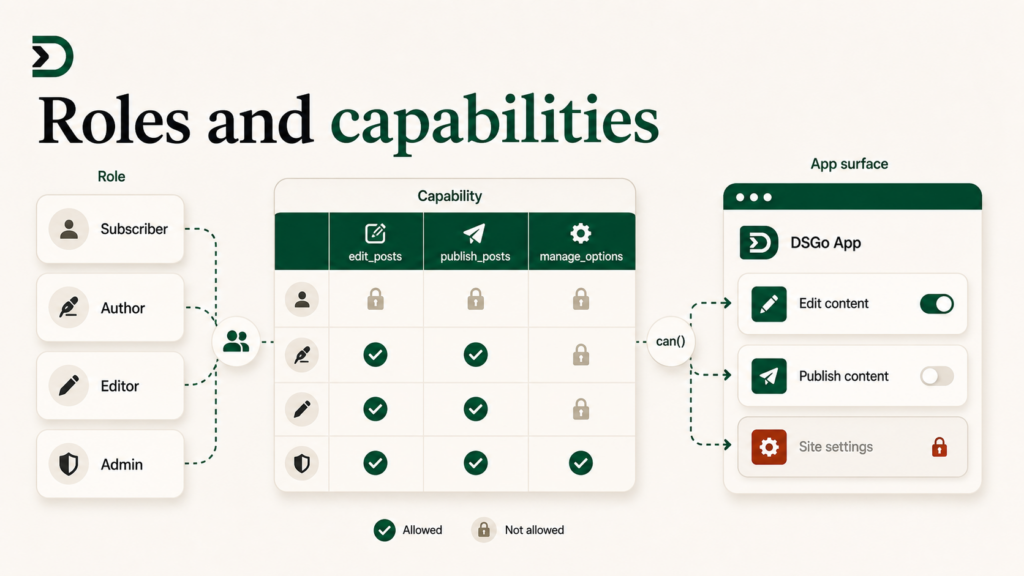
If you build a DesignSetGo App that does anything beyond render a static page, the first WordPress concept you have to internalize is capabilities. Not roles. Capabilities. Most developers conflate the two and end up shipping the wrong UI to the wrong user.
This is the primer. What roles are, what capabilities are, why the WordPress ecosystem distinguishes them so carefully, the five capabilities you will use most as an app author, and the gotchas that come up the first month.
If you came from React + Vercel and “auth” means JWTs and a database table called users, this is the WordPress mental model you are missing.
Roles are nouns. Capabilities are verbs.
A role is a label. WordPress ships five: subscriber, contributor, author, editor, administrator. Multisite adds super_admin. Plugins add more: WooCommerce adds customer and shop_manager. LearnDash adds group_leader. Membership plugins add subscription tiers.
A capability is a permission to do a thing. edit_posts. publish_posts. manage_options. delete_users. manage_woocommerce. Capabilities are the actions the system allows.
The relationship: a role contains a bundle of capabilities. The administrator role contains manage_options. The editor role contains edit_others_posts but not manage_options. The subscriber role contains read and not much else.
The mental shift: when your app asks “can this user do X?”, the answer is always about capabilities, not roles. The role is the bundle. The capability is the actual unit of permission.
Why the distinction matters
Three reasons that come up immediately when you ship.
Custom roles. Sites add roles all the time. “Membership Tier 2.” “Shop manager.” “Content moderator.” If your app gates on role === 'editor', it breaks on every site with a custom role that should have editor-like permissions. If you gate on can('edit_posts'), you do not care which role the site is using.
Multisite and role-management plugins. Multisite has its own role layer. Role management plugins (User Role Editor, Members) let admins clone and edit roles. The shape of “what role this user is” is fluid. The shape of “what capabilities they have” is stable.
Plugin-registered capabilities. WooCommerce’s manage_woocommerce does not belong to a role you can name. It is on shop_manager and administrator, and on whatever custom roles the site owner added it to. Asking the role tells you nothing. Asking the capability tells you what you need to know.
The capability is the right unit because it survives role customization, multisite, and the inevitable “wait, why is this user a Subscriber and also a Shop Manager?” conversation.
The five capabilities you will actually use
Out of the dozens WordPress ships, these five cover 90% of what app authors check:
read. Every logged-in user has this. The boring “is the user signed in at all” check. If this returns true, you have a dsgo.user.current() you can read.
edit_posts. Can the user write content? True for authors, editors, administrators, and any custom role with editorial permissions. False for subscribers and contributors who have not graduated to authors yet (contributors can write but not publish). Use this for “show the edit pencil” UI.
publish_posts. Stronger version of edit_posts. Authors and above. Use this for “show the publish button.”
edit_others_posts. Editors and above. The mental model: “is this user a content gatekeeper?” Use this for moderation UIs, content approval flows, and admin-only views in a content app.
manage_options. Administrators (and super admins). The “you can change site settings” capability. If you are gating an “Admin” tab in your app, this is usually the right one.
You can build most of an app’s permission story with these five. The deeper list is at wordpress.org/documentation/article/roles-and-capabilities, and Tuesday’s deep dive on dsgo.user.can() walks the bridge surface.
Plugin-registered capabilities
This is the part most React developers miss the first time.
WordPress capabilities are not a fixed list. Plugins register their own. The site you are building an app for probably has fifty more capabilities than vanilla WordPress, because each installed plugin adds its own.
Examples in the wild:
- WooCommerce.
manage_woocommerce,view_woocommerce_reports,manage_product_terms,edit_shop_orders,assign_product_terms. - Yoast SEO Premium.
wpseo_manage_options,wpseo_manage_redirects. - LearnDash.
manage_groups,view_groups_reports. - Memberships plugins. Per-tier capabilities like
view_member_only_content.
Your app can ask about any of them:
const canRunStoreReports = await dsgo.user.can('view_woocommerce_reports');
if (canRunStoreReports) {
  // render the analytics tab
}
If WooCommerce is installed and the user has that capability, this returns true. If WooCommerce is not installed (or the capability does not exist on the site), it returns false. You do not have to detect which plugins are present; the capability check answers both questions in one call.
This is the most powerful thing about the WordPress capability system and the easiest to underuse. Your app can adapt to whatever the site has installed without knowing in advance.
The gotchas
Capability name is a string, not a constant. There is no autocomplete. Typos like edit_post (singular) silently return false instead of throwing. Cross-reference the capabilities reference before you ship.
current_user_can() for an object-aware capability needs the object ID. WordPress has “primitive” capabilities (edit_posts) and “meta” capabilities (edit_post, singular, takes an ID). The bridge surface accepts both forms: dsgo.user.can('edit_post', 42) checks “can this user edit this specific post.” Use the meta form when you are gating actions on a specific record (because authors can edit their own posts but not other people’s).
Subscribers exist and they are not logged out. A subscriber is a logged-in user with the read capability and almost nothing else. Treat “logged in” and “can do things” as different questions. The first is dsgo.user.current() !== null. The second is dsgo.user.can('edit_posts') or whatever the specific verb is.
Capabilities can change during a session. A site admin can promote a user mid-session. Your app should not cache the result of a capability check across long sessions; call it again when the user does something that depends on it. The bridge caches on the WordPress side (current-request) so the calls are cheap.
The check runs against the visitor’s WordPress session, not your app’s identity. There is no “app identity.” The app inherits the visitor’s session. If the visitor is logged out, every role-gated capability returns false. There is no way around this and you should not want one.
How this maps to the bridge
In a DesignSetGo App, three calls cover the entire user/permission surface:
// Who is this person?
const user = await dsgo.user.current();
// null if logged out, otherwise { id, name, email, roles, capabilities }

// Can they do this verb?
const canEdit = await dsgo.user.can('edit_posts');

// Can they do this verb on this specific object?
const canEditThisPost = await dsgo.user.can('edit_post', 42);
That is the API. The complexity is on the WordPress side, where role-management plugins, multisite, and the constellation of plugin-registered capabilities are doing real work. Your app sits on top and asks questions.
The shorter version
Capabilities are verbs. Roles are nouns. Always ask about verbs. The bridge gives you dsgo.user.can(). The capability list includes every capability every installed plugin registers, so your app gets WooCommerce-aware, LearnDash-aware, WP Members-aware UI gating for free.
If you internalize this one thing, half the “how do I do auth in this app?” questions disappear.
Further reading
- dsgo.user.can() deep dive: the bridge-side tutorial.
- BRIDGE-API.md §user: the full user surface.
- WordPress official roles and capabilities reference: the canonical list of built-in caps.